
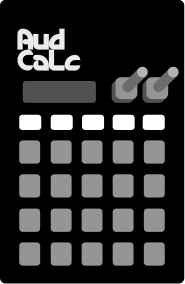

Hold ON to power on.
Hold sound + 1-16 key to select the target channel.

Hold pat + 1-16 key to select an edit pattern. When playing, the pattern won’t change until the end of the bar. Hold and select multiple patterns to setup a playback chain (up to 16 chain steps)

Hold prm + 1-16 key to select a parameter on the current voice to edit. Some other keys have additional parameters, and some keys have a second page of parameters that can be entered by pressing the key twice while holding prm.
Hold exit + ON to shut down the device. exit + pat to clear the current pattern. exit + smp + 1-16 to clear a sample.

Hold smp + 16 to sample
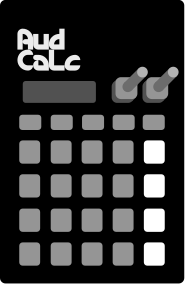

Hold mute + 1-16 key to mute a sequence channel.

Choose edit page when sequencing patterns with more than 16 steps.

Start playing back the pattern. When in sync input mode, will wait for an external trigger to start.

Switch between sequence recording and note playing for the 16 keys. Rec + play to enter “live record”.
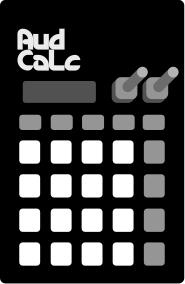
 hold
hold
Hold ON (top left key) to turn on the device.
tap
Press a 1-16 key to play a note. As you are doing further edits, keep pressing the 1-16 keys to hear your sound change.
hold +
 tap
tap
Hold prm + 5 (env1) then turn the B knob to increase the decay on the sound. It will ring out for longer.
hold +
 tap
hold +
tap
hold +
 tap
tap
Hold prm + 11 (Lfo Target), then choose Cut to route the LFO to cutoff. Hold prm + 7, then edit the Rate and Depth to change the wobble amount.
hold +
 tap
hold +
tap
hold +
 tap
tap
Hold prm + 16 (Mode), then choose Synth with the A knob, and WMAP with the B knob. Hold prm + 1 (timbre) then edit the sound with the A + B knobs.
tap
tap
tap
Press the rec key (lower right) to enter record
mode.
Now Press the 1-16 keys to set the current note to
play on those steps.
Press play (above rec key) to
hear the pattern playback.
hold +
tap
tap
Exit play mode, then hold rec + press play. This
will enter live write (play button will light up
red).
Press the 1-16 keys to enter notes live.
hold +
 tap
tap
Hold prm + 14 (prob) then use A to set Rnd and B to set the percentage of notes that will play randomly.
hold +
 tap
hold +
tap
hold +
 turn
turn
Hold prm + 2 (Filter) to enter cutoff editing. Hold down the rec key and twist the A knob to store a live filter cutoff sequence.
hold +
 tap
hold +
turn
tap
hold +
turn
Hold prm + 15 (Fxs). Make sure write is on (rec key is red) but live write is off (play is green or unlit). Hold down a step that has a note recorded (the 1-16 key is purple). While holding this key rotate A knob to increase the delay fx send for this step.
Hold prm & press one of the 1-16 buttons to select a parameter. When a parameter is selected, it will be displayed onscreen, and using the a/b knobs will edit it. Most parameters apply to the voice across all patterns, except as noted.
Note:
Some parameters have a second page, which is accessed by holding prm & pressing the 1-16 button a second time while already on this page.
When in synth mode, this affects the voice. See the Synth information for details on what each knob does. In Sample mode this changes sample in / out points. In midi mode this edits velocity & hold time.
Lowpass filter, A controls cutoff, B controls resonance.

A controls volume, B controls panning.

A controls legato, the speed at which pitches slide to the next pitch. B controls fine tuning of the note.
This envelope is always routed to volume, but can be optionally routed to a second target. A controls attack time, B controls decay time.

This envelope is unrouted by default. It can be routed to a single target. A controls attack time, B controls decay time.
The LFO speed is derived from the current tempo, so changing the tempo will alter this speed. A controls speed, B controls depth.

A controls speed. Lower speeds are faster. B controls Length. Length is how many retriggers there will be.

An additional routing for the Env. Depth is how much the envelope effects the parameter. Negative depth reverses the effect of the envelope (fades out then in).

A controls routing for the second Envelope. This is required on Env 2. B Controls depth, how much the envelope effects the parameter. Negative depth reverses the effect of the envelope (fades out then in).

A Controls destination for the LFO.

A controls if the retrigger fades in (negative) or fades out (positive).

How many steps this voice uses on this pattern, and how fast each step is. This can be set per voice per pattern. When editing this parameter, press prm+13 again to double the pattern length, copying the existing pattern twice as long.
Sets a random probability for each step (or an individual step is set via parameter locks).
A sets condition type, Rnd or Len. B controls the condition depending on the type.
Delay and reverb sends. Press prm+fxs a second time to access delay settings. The delay is a simple digital buffer, so live edits will introduce glitches.
Under the voice mode parameter (16) - there are three submodes, each with several options. A controls the primary mode, and B controls the secondary mode.
hold +
tap
Sync can be set to PO (2 pulses per quarter note, pocket operator), 4PQ (4 pulses per quarter note, volca), Midi, or a combination of midi & one of the other two. Press a second time to access Sync Out and global volume settings.
High global volumes can cause distortion on the output, which may be desired.
hold +
tap
Octave and root note apply to the 1-16 buttons. Press a second time to access different scales. These settings will not change existing recorded notes.
hold +
tap
During playback, when you change patterns, audcalc will wait until the end of this bar length before changing patterns. This setting allows you to change patterns slower or faster. Useful if you want to change every four measures.
There are two ways to record notes into a pattern, step mode & live mode.
While write is not lit, choose a note by pressing a button 1-16. Then press rec to enter recording mode. Pressing buttons 1-16 will enter the last selected note on those steps.
While rec is not lit, and the pattern is not playing, hold rec, then press play. Once in live mode, notes played using the buttons 1-16 will be stored in the current pattern.
While in step mode, hold down a lit step and move a knob to store a parameter lock for that step. There are 128*16 parameter locks available.
While in playback, holding down record and moving a knob will store parameter locks for playing steps as it passes.
To change the page you are currently editing for the pattern, press the page button. This only applies if the pattern has more than 16 steps.
Hold rec + sound + 1-16 to copy the current voice to a different channel. This will overwrite the voice in this channel.
Hold rec + pat + 1-16 to copy the current pattern to a different pattern.
Hold exit + pat to erase the current pattern.
Hold Exit + prm to erase the current Voice.
There are 8 voices, but 16 sequence channels. Voices are grouped in pairs, 1-5, 2-6, 9-13 and so on. Voices will be muted when a voice from their pair starts playing. This does not apply to midi channels.
Hold rec while plugging in usb (from device off) to enter usb boot mode. This allows you to flash new firmware.
There are also two small buttons on the right of the unit. The top is uboot, and the bottom is reset. Hold uboot (top button), then press reset (bottom button) to reboot in USB mode.
The clock sync can be driven in PO mode (pulse per 1/8th note) or volca (pulse per 1/16th note). The audio input has protection diodes, and will clamp input voltages.
Note If there is crosstalk with loud clock signals, use the included attenuator to lower the volume of the signal.
Audcalc would not have been possible without tons of open source software. AudCalc also is open source and is permissively licensed where possible. Full license details are on https://github.com/jonbro/Audcalc/
Auto Crossover Midi input circuit is used with permission from kay / lpzw modules
M6x11 is free to use with attribution by Daniel Linssen
ZLib/libpng licence covers the following portions of the code
Nanopb Copyright (c) 2011 Petteri Aimonen
The MIT License covers the following portions of the code
SSD1306 rp2040 driver Copyright (c) 2021 David Schramm
Braids Copyright 2012 Emilie Gillet (emilie.o.gillet@gmail.com)
TinyUsb
Copyright (c) 2019 Ha Thach (tinyusb.org)
Copyright (c) 2020 Jerzy Kasenbreg
Software License Agreement (BSD License) covers the following portions of the code
gfx_font Copyright (c) 2012 Adafruit Industries. All rights reserved.
BSD 3-Clause "New" or "Revised" License covers the following portions of the code
ws2812 driver Copyright 2020 (c) 2020 Raspberry Pi (Trading) Ltd.
Apache license v2 covers the following portions of the code
q15 math Copyright (C) 2010-2022 ARM Limited or its affiliates. All rights reserved.
Christophe Favergeon
ZLib/libpng licence covers the following portions of the code
Nanopb Copyright (c) 2011 Petteri Aimonen
Thanks to Morgan & Ziv for letting me play with this stuff so much. Its been a journey.
Greetz to the Plinky Discord. What a weird feral synth chat room. Wouldn't have been possible without you.